> For the complete documentation index, see [llms.txt](https://scanslibrary.gitbook.io/procdural-world-generator-ue5/llms.txt). Markdown versions of documentation pages are available by appending `.md` to page URLs; this page is available as [Markdown](https://scanslibrary.gitbook.io/procdural-world-generator-ue5/multi-biomes/getting-started/quickstart.md).
# Quickstart
## Main Folder:
You can find the **Multi-Biome** files:
{% hint style="info" %}
\\\Content\ProceduralWorldGen\MultiBiomes
{% endhint %}
You can check the **Multi Biomes Map** to see how we did everything:
{% hint style="warning" %}
\\\Content\ProceduralWorldGen\Maps\Multi\_Biomes.umap
{% endhint %}
## D**ependencies**
**Important:**
Install all the dependencies before adding **Procedural Multi Biomes** to your project. Otherwise, you may have missing variables and **Procedural Multi Biomes** will not work properly.
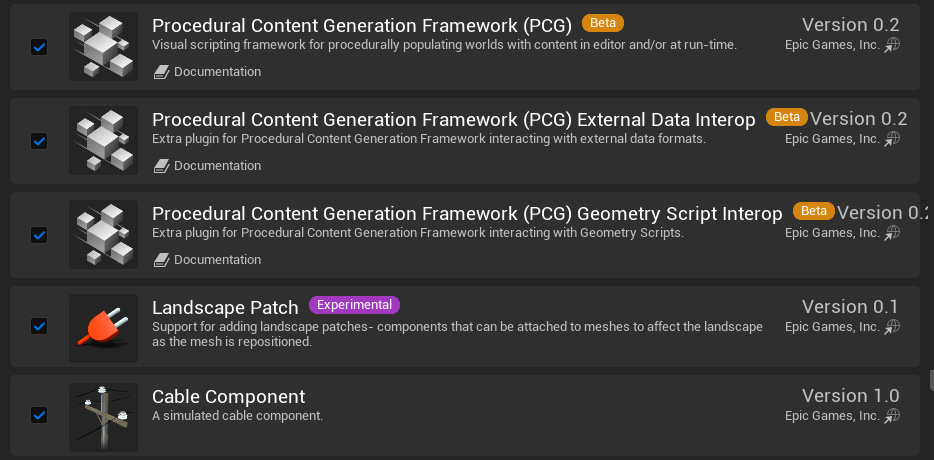
## **1 -** Enable Plugins**:**
1. *Procedural Content Generation Framework (PCG)*
2. *Procedural Content Generation Framework (PCG) External Data Interop*
3. *Procedural Content Generation Framework (PCG) Geometry Script Interop*
4. *Cable Component*
5. *Landscape Patch*
6. Water System
Be sure never to move **Procedural Multi Biomes** folder in your project, this could cause some problems with updating and cloning tools.
***
## 2- Preparing the Landscape and Lighting Setup:
{% hint style="warning" %}
Required when you create a new map.
{% endhint %}
**Procedural Multi Biomes** requires a specially designed "**Landscape Material**" for its operation.
ScansLibrary assets are **PBR calibrated**. So when you create a new map use the this lighting settings
### **2a- Lighting Setup:**
**Copy the entire text and press CTRL+V on the UE5 viewport.**
{% embed url="" %}
{% embed url="" %}
***
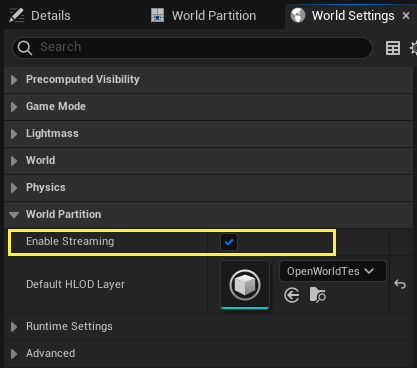
### **2b-** Enabling World Partition
"**World Partition**" should be enabled for PCG to work more efficiently.
### **2c- Multi Biomes Landscape Material :**
> \\\Content\ProceduralWorldGen\MultiBiomes\Landscape\\**MI\_MultiBiomes\_Spring\_Ins**
>
> \\\Content\ProceduralWorldGen\MultiBiomes\Landscape\\**MI\_MultiBiomes\_Summer\_Fall\_Ins**
***
### **2d- Procedural World Generator Volume Setup:**
**Procedural Multi Biomes** includes three different PCG generators. You should use one of the Spring, Summer or Autumn versions, depending on the landscape you wish to create.
> \\\Content\ProceduralWorldGen\MultiBiomes\PCG
* Pocedural\_Multi\_Biomes\_Fall
* Pocedural\_Multi\_Biomes\_Summer\_Spring
{% hint style="warning" %}
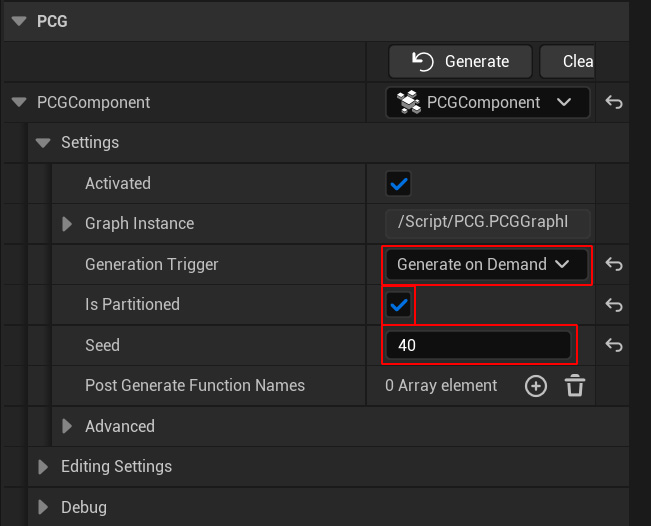
You must change the **Procedural Component settings**.
{% endhint %}
{% hint style="warning" %}
You need to align the **Procedural Multi Biomes volume** to your **map**.
{% endhint %}
{% hint style="success" %}
Proceed to the "[**Tutorial**](/procdural-world-generator-ue5/multi-biomes/getting-started/road_map.md)" tab for the advanced level.
{% endhint %}
## System Requirements
**Note:** If you want to use **7 or more biomes** on a map, the minimum system requirements (**GPU VRAM is more important**) requirements are as follows **(Applicable to the UE Editor. Compiled project requires less VRAM**):
* **8 GB VRAM (1080p Epic Setting):**
* NVIDIA GeForce RTX 4060, RTX 3060 (8GB variant), RTX 2060 Super
* AMD Radeon RX 7600, RX 6600, RX 6600 XT
* **12 GB VRAM (1080p Cinematicc / 1440p Epic Setting):**
* NVIDIA GeForce RTX 4070, RTX 4070 Super, RTX 3060 (12GB variant)
* AMD Radeon RX 6700 XT, RX 6750 XT, Intel Arc B580
* **16 GB VRAM (1440p/4K Epic Setting):**
* NVIDIA GeForce RTX 4080, RTX 4080 Super, RTX 4070 Ti Super, RTX 5070
* AMD Radeon RX 7800 XT, RX 7900 XT
* **24 GB+ VRAM (Cinematic 4K Setting):**
* NVIDIA GeForce RTX 4090, RTX 3090
* AMD Radeon RX 7900 XTX
#### Join us on Discord
Join us on [Discord](https://discord.gg/mW5Suxb) to get help if you can't find your answer in the documentation!